Short answer
Update 0.6.0 sets world-container respawn to one real-world hour. Do not use a sleep duration as a substitute for that timer. Check the container type and your installed version before diagnosing missing loot.
What loot should I keep rather than sell?
Keep active quest items and the next trip's supplies first. Then reserve materials for a recipe you actually intend to use; this is not an instruction to hoard every crafting item.
| Item group | Why keep it? | Check before selling surplus |
|---|---|---|
| Mechanical / Advanced Mechanical Components | Weapon repairs and crafting | Your weapon's repair class |
| Kevlar Weave / Armor Plate | Armor repair materials | Your armor recipe |
| Medicine / Chemical Waste | Recovery and crafting | Needed supplies and unlocked recipes |
| Mutant parts | Possible Job requirements | The exact active objective |
Source: Georg — loot priorities, September 20 revision; community advice ↗
Ready to sell? Check the item's Job marker, set aside recipe quantities, then compare the trader's category and actual quote. A higher nominal quote is not automatically worth a longer, expensive trip. No fixed Rubles-per-slot profit target is assumed here.
I have the materials: which station makes the item?
LUKIIA station reference The guide identifies medical crafting at the medical station, armor repair crafting at the tailoring station, and gun maintenance crafting on the weapon bench's right side. Its left side handles modifications; use the annotated bench image to distinguish them.
Source: LUKIIA — facility images; updated September 16, with a 0.6 base and selected 0.7 additions ↗
How to tell it worked
The selected station shows the intended recipe and its ingredient requirements. After crafting, the resulting item is visible in Inventory.
If it still fails
If the recipe is absent, check station interaction and blueprint access. If it is disabled, compare the displayed ingredient quantities and unlock requirement. For armor or weapon repairs, a crafted item still needs to be applied and checked separately.
First, identify the container
Keep ordinary containers, quest containers and personal storage separate. A container-refresh rule does not promise replacement quest rewards or restore an item you sold.
Source: Official 0.6.0 Items & Crafting notes — reviewed September 15, 2026 ↗
Source: Scavland Steam store page ↗
Container still empty? Check these first
- Identify what you opened.Record the location and container. Compare the same container, not a similar-looking one elsewhere.
- Measure elapsed time.Write down when you looted it. The patch does not explain whether offline or paused time counts, so record those separately.
- Keep a before-and-after record.If the expected refresh fails, include the game version and whether you changed area or reloaded. Avoid treating one empty return visit as a universal rule.
How to tell it worked
The same ordinary world container has refreshed when you revisit it. Do not expect an identical item roll or apply the result to a quest reward or stash.
If it still fails
Record the real elapsed time, any paused or offline period, the exact container and your build. Offline and paused timer behavior are not verified here, so a failed test does not establish a universal no-respawn bug.
I left items in a corpse or bunker container
A developer warning distinguishes these from personal storage: bodies decay and world containers reset. Bunker interiors also reset after three real-world hours. Do not store valuable supplies there between trips. For an already changed interior, see the reported loss and evidence limits; no recovery trick is confirmed.
Source: Developer warning about containers, corpses and bunker resets ↗
Does sleeping reset loot or bunkers?
Sleep skips game time; the world keeps running and saving is disabled during sleep. The container note does not promise an immediate refill after waking. Bunkers have a separate reset rule.
Stash expansion and separate camp storage in 0.7.0
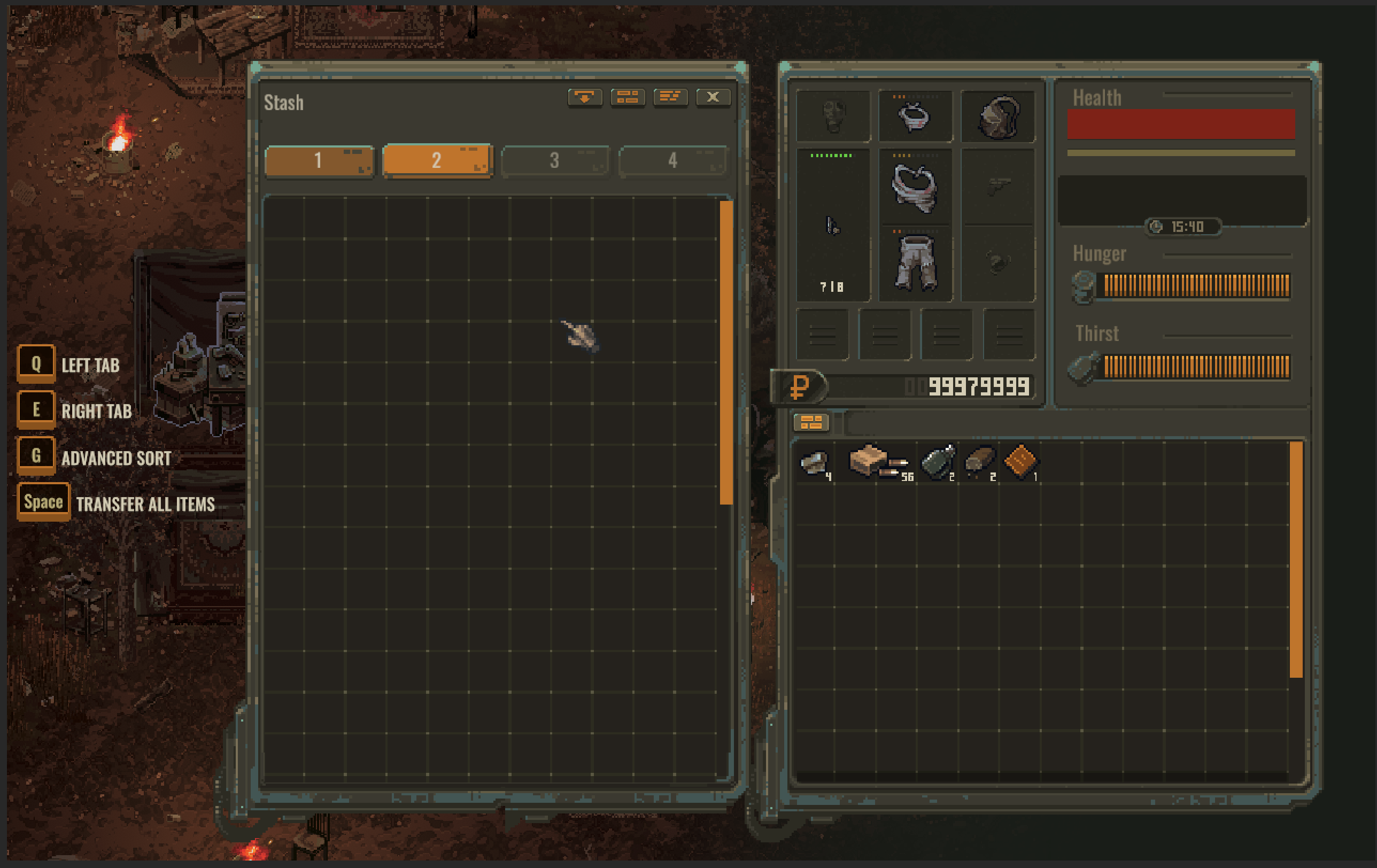
An extra stash tab costs 50,000 Rubles from a trader. Currently only main-village storage is expandable; other main camps have one tab and do not share the village's items.
Before reporting missing belongings, return to the storage where you deposited them and check the tab. Keep a note of the camp name when moving supplies. The older blanket statement that every stash shares inventory no longer describes all camp storage.
Check a missing item in this order
- Confirm the camp.Return to the camp where you deposited it. A different camp's empty stash does not establish item loss.
- Check the selected tab.Look at the numbered tabs above the stash grid, then inspect each unlocked tab. The highlighted tab is the one you are viewing.
- Compare stash and backpack.Look on both sides of the interface before moving more items. For a valuable quest item, check one transfer at a time and confirm where it ends up.
The pictured keyboard layout shows Q / E for tabs and Space for a bulk transfer. These are screenshot-specific prompts, not guaranteed bindings for a remapped keyboard or controller. Read the prompts displayed in your own game.
How to tell it worked
You locate the item in the original camp, an unlocked tab or your backpack. Verify a valuable item on the intended side after each transfer.
If it still fails
Stop bulk transfers while checking. Record the camp, tab, item and last action before it disappeared, with screenshots of both inventory grids. Buying an expansion is not a missing-item recovery method.
If the storage interface itself will not open
Check the installed version against the 0.7.1 hotfix. If it still fails after updating, record the camp and save involved for in-game Feedback.
Source: Update 0.7.0 — camp storage and expansion rules ↗
Source: Hotfix 0.7.1 — stash-opening fix ↗
How to tell it worked
The storage interface opens and its tabs can be inspected. Opening the UI does not by itself confirm that a missing item was recovered.
If it still fails
If the same camp stash still fails after the applicable update, preserve your save and include the camp and installed version in Feedback. Do not delete the save to test an unverified workaround.
Use storage before collecting quest rewards
Leave enough empty slots for the item you are about to receive. Check that it actually entered your backpack before leaving the NPC. For the reported dropped-lime case, see Bogdan quest item checks.
Inventory triage that does not need a loot table
- Tag the objective item.If it is a quest item, compare it with the official inventory-marker note before discarding or storing it.
- Protect survival supplies.Reserve space for the current trip's consumables and return plan; do not treat every scrap item as equal.
- Record unknown loot.Write down the container, area, item, and date instead of turning one find into a universal drop table.
- Report a suspected empty container carefully.Capture the save age, location, whether it was previously looted, and current version. “No respawn” is not yet the proven explanation.
0.6.0 timing Exact loot contents and offline timer behavior remain unverified. This is not a complete drop table.
Source: Steam Community discussions: loot, inventory, and item-class questions ↗
Loot FAQ
Does loot respawn in Scavland?
Yes. The world-container timer is documented in Update 0.6.0 above. It should not be applied to every quest item or personal stash.
Does sleeping refill every container?
The official notes do not establish that shortcut. Follow the container timer rather than assuming a number of hours slept triggers a refill.
Does the timer run while I am offline?
The cited notes do not specify offline or paused behavior. Record those conditions when testing a container.